Note that if you have not fully tested your code before distribution to users this error message will be visible to users and will cause a big loss of confidence in your Excel application. An example of ignoring Excel worksheet errorswarnings using the worksheet ignore_errors method.
 Error Setting Plotarea Width In Excel Vba Excel 2010 Stack Overflow
Once you do this the file will be considered trusted.
Excel worksheet setting error. Excel will select the first error it finds and stops. Ad Find Online Inventory Program. Ad Download over 20000 K-7 worksheets covering math reading social studies and more.
If the data to be placed in cells is exceeding the width range of the cell Excel is probably going to display this error. Error Setting A Worksheet The result for tab_src. Search Faster Better.
This error indicates that some process that is running inside Excel will not let Excel close. Click on the cell where you want the Standard Error to appear and click on the formula bar next to the fx symbol just below your toolbar. What to do If you need to preserve the sheet views dont save the file as Excel 97-2003.
Click the arrow next to Error Bars and then click More Options On the last tab of the Format Error Bars pane under Error Amount select Custom and click the Specify Value button. Unable to set the RightFooter property of the PageSetup class The LeftFooter and CenterFooter properties get set just fine. Sub ObjectErrorOne Dim ws As Worksheet Missed the SET statement here ws ThisWorkbookSheets sheet1 wsRange A1Value Sample Value.
To do this click on the File tab. Of range means the code cannot find the worksheet. Type the symbol in the formula bar.
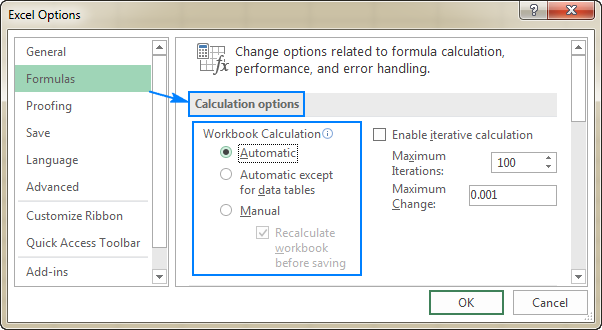
To resolve this problem try the following methods as appropriate in the given order. If you open a workbook that has sheet views in Excel desktop versions the sheet views are unavailable. Click Advanced and then under When calculating this workbook select the Set precision as displayed check box and then click OK.
Needs to equal a sheet name. In the worksheet select the cells that you want to format. You will now see a blue arrow drawn across the current row where all of the data used by the currently selected formula appears.
However if I change the order in which the properties are set then the last one be it LeftFooter or CenterFooter triggers the error and the previous two always get set successfully. Each blue dot on this arrow corresponds to a value that is used in the formula while the arrowhead points to the end value. The window displays information about the error and options for resolving or ignoring the error similar to what we saw in the Smart Tag.
In the Properties window set the Visible property to 2 - xlSheetVeryHidden. Search Faster Better. Discover learning games guided lessons and other interactive activities for children.
722020 You receive the following error message in Microsoft Excel. When you click the next button below Excel will select the next cell it finds with an error and update the error information if the error is different. Another way that you can enable ActiveX controls in Excel is through your settings section.
The error will stop your code from running completely and flag up by means of a message box that this error needs sorting out. An error occurred when sending commands to the program. 12212020 This excel error is following the width of the cell in the spreadsheet.
If you save the file as Excel 97-2003 format the sheet views are discarded. An example of turning off worksheet cells errorswarnings using the XlsxWriter Python module. Where it says Enable All Content choose Always enable this documents active content.
Ad Download over 20000 K-7 worksheets covering math reading social studies and more. 6162019 Below code throws the error as we had not mentioned SET statement here. Click the Chart Elements button.
2172020 In the Project Explorer window click on the worksheet you want to make very hidden to select it. It will not show all the characters rather the number sign is going to appear in the cell. Ignoring Worksheet errors and warnings.
342020 To make custom error bars in Excel carry out these steps. Usually the error file from Excel is put in Documents and Settings under Local Application Data or somethingI dont remember the exact location. STDEV Drag and select the range of cells that are part of your sample data.
12292009 If you have a worksheet error when opening a TAGSETEXCELXP spreadsheet the error comes from Excel having a problem with the XML or the STYLE. Choose Enable Content in the Security Warning area. Ad Find Online Inventory Program.
On the Home tab click the Dialog Box Launcher next to. Discover learning games guided lessons and other interactive activities for children.


